


GPS Tracker - Live Locator
3.832.00 Reviews
App Specs
- Version
- 1.0.6
- Updated On
- License
- Free
- Downloads
- 1,000,000+
- Developer
- THE DRAKEN GROUP, LLC
- Categories
- Maps & Navigation
- Platform
- Android
Screenshots
 Analysis by AppCompare
I think a location-sharing app is most useful when everyone involved knows why it is being used and agrees to share. GPS Tracker - Live Locator is built around that everyday need: checking where friends or family are without turning a string of messages into a running travel report. I’d treat it as a convenience for coordinating and staying reassured, not as a substitute for calling someone or a guarantee that a map position is perfectly current.
How quickly should you expect a location to appear?
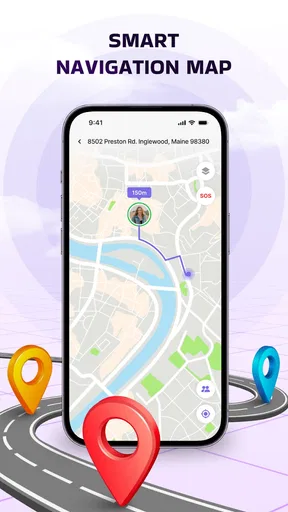
The appeal of a live locator is immediacy, but a map can only be as helpful as the phone and connection behind it. I would avoid reading a moving marker as a frame-by-frame view of someone’s journey. A displayed position is better used to answer practical questions—whether a person seems to be on the way, or whether it is worth sending a message—than to time their arrival down to the minute.
That distinction matters in a busy day. If a friend is meeting you across town, checking the map once can help you decide whether to wait inside or head toward the entrance. If their position appears unchanged, I would confirm directly before assuming they have stopped or gone the wrong way. A location display is useful context, not a conversation.
What changes during a busy day?
Location sharing is most valuable when it removes repeated coordination, such as a family trying to meet after separate errands or friends arriving at the same event. It is less useful when everybody is constantly opening the map to monitor everybody else. I’d agree on a specific purpose and keep checking proportionate to it; that makes the shared location feel like a practical tool rather than a demand for attention.
For a parent coordinating a pickup, for example, a shared map may help show whether the other adult is already approaching the meeting point. It should not replace the agreed pickup plan, especially if a phone is put away, loses connectivity, or runs out of charge. Keeping a fallback—such as a call or a clear meeting place—makes the app more useful precisely because it does not have to carry the whole responsibility.
Who is likely to find it useful?
This kind of location-sharing app makes the most sense for people who already have a reason to coordinate with one another: relatives arranging a meeting, friends travelling separately, or a group trying to find each other at a crowded venue. Its value comes from mutual, understood sharing. If you only need directions for yourself, a standard navigation app is a better fit; if you need a formal safety service or dependable emergency response, I would choose a purpose-built option instead.
One low-friction habit is to decide in advance when sharing should end. For a single outing, agree that the location is for getting to the meeting point rather than leaving it on indefinitely. Before relying on a shared map, also check that the people you expect to see have actually joined and can use the app. That small check avoids the awkward discovery that everyone thought someone else had shared their position.
Worth Reading Before You Choose

EA SPORTS FC Mobile 26 Is a Bigger Football Game, but It Takes Time

Flipboard Shows What News Apps Must Do Beyond the Feed

Switching to Android Auto Means Rethinking Your Driving Routine

Google Calendar Makes a Crowded Week Easier to Manage

Ludo King Makes the Most of the Minutes Between Plans

Baby Panda World Brings Quick Play to Modern Phones, but Its Game Library Feels Busy
How it compares with familiar alternatives
Messaging apps often handle a one-off location share well, while a map service is usually stronger when the main task is planning a route. A dedicated locator is more appealing when the same people want a shared place to check, but that convenience depends on the group adopting it and keeping location sharing intentional. I would not install another app just to duplicate a feature your group already uses comfortably; the extra setup is worthwhile only if a shared view makes your routine simpler.
There is also a social trade-off. Knowing where someone is can save a few messages, but it can feel intrusive if the reason and duration are unclear. I’d explain what the group is using the map for, ask before sharing, and make it easy to stop. The best arrangement is one where nobody has to guess whether location sharing is expected.
Reliability, privacy, and practical limits
For dependable coordination, I would treat the map as one signal rather than the whole plan. Phone settings, connectivity, and whether the other person is actively sharing can all affect what you see in a location-based app. If something looks surprising, refresh your understanding by contacting them instead of drawing a conclusion from the marker alone. This is especially important for school pickups, travel changes, or any situation where a delay has real consequences.
Privacy is not just a setting; it is a habit shared by everyone in the group. Keep the circle limited to people who need access, agree on the purpose, and review who can see the location when plans change. A family member may be comfortable sharing during a trip but not throughout an ordinary week. I would make that boundary explicit rather than assuming that one invitation means permanent consent.
Device demands and a sensible setup
I would not assume that a locator is effortless on every phone simply because it runs in the background. Continuous location use can involve trade-offs with battery and device settings, and the experience may vary between phones. Start with the basic task you actually need, then see whether the phone continues to behave normally during a typical day. If battery life becomes a concern, limit sharing to the period when coordination matters instead of leaving it active by default.
Before a trip or meetup, have each person open the app, confirm that sharing is in place, and agree on a backup contact method. This is a more useful reliability check than waiting until somebody is already late. It also helps answer a common practical question: what should you do if a person does not appear? Treat that as a prompt to message or call them, not proof that something has happened.
Getting Started: Easy as Pie
First things first, downloading and setting up GPS Tracker - Live Locator was a breeze. Available for both Android and iOS, you can snag it from the Google Play Store or the App Store. Once installed, the interface welcomes you with a simple and intuitive design. No need to be a tech whiz here; everything is laid out in a straightforward manner.
Features That Stand Out
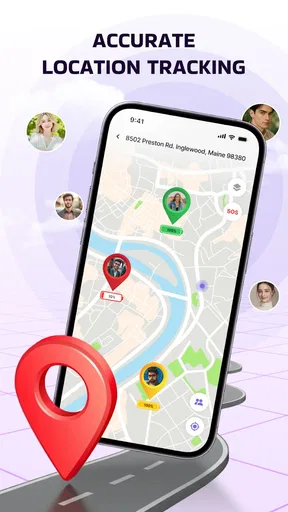
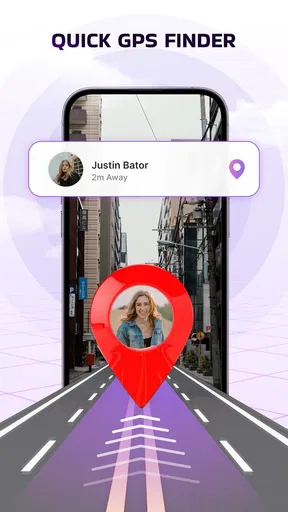
What caught my eye immediately was the real-time tracking feature. You can literally see the movement of your contacts on a map, which updates faster than you can say "where are they?" It’s not just a dot on a screen either; the app provides detailed location info, making it super handy for keeping tabs on loved ones.
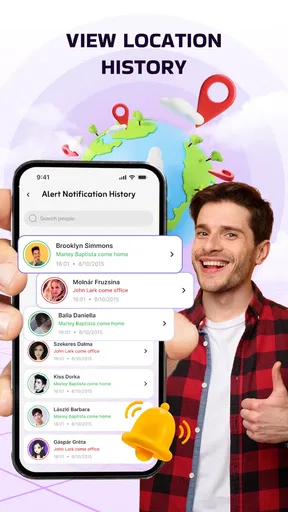
Another neat feature is the ability to set up geofences. Imagine creating a virtual boundary around your kid’s school or your partner’s workplace. You’ve got the option to receive alerts when they enter or leave these zones. It’s like having a digital guardian angel watching over them.
Privacy: Your Data, Your Choice
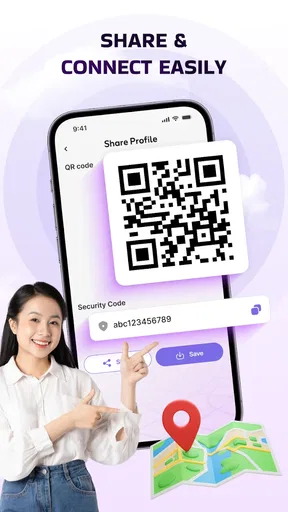
Now, I know what you might be thinking: "What about privacy?" The app’s developers seem to have thought this through. You have full control over who can see your location. Sharing is by invitation only, and you can revoke access anytime. This gives you peace of mind knowing that your location data isn’t floating around the internet.
Battery Life: A Pleasant Surprise
One of my initial concerns was how much this app would drain my phone’s battery. To my surprise, it’s pretty efficient. The app uses a smart algorithm to balance tracking accuracy with battery consumption, so you can leave it running in the background without constantly worrying about your phone dying on you.
Final Thoughts: A Must-Have for Peace of Mind
All in all, GPS Tracker - Live Locator is a solid choice if you’re looking to keep track of your friends and family. It’s packed with useful features wrapped in an easy-to-use interface. Whether you’re a parent wanting to ensure your kids' safety, or just someone who likes knowing where their loved ones are, this app delivers. So, why not give it a shot and see how it fits into your daily life?
In the wider maps and navigation category, this app serves a different purpose from turn-by-turn route planners: its focus is seeing shared positions and coordinating with people, rather than finding the fastest drive. GPS Tracker - Live Locator is free, developed by DEV SUKA MAJU, and its current version is 1.0.6. It has a 3.0 average from 399 ratings, with 16 written reviews and over 500K installs. It is rated for Everyone and was released on Dec 1, 2025; the minimum OS is 10. Those details make it easy to assess its reach, but the modest average rating is a sensible reason to try it with a low-stakes plan before relying on it for anything important.
A useful first test is a short outing with someone who understands the arrangement. Check that both of you can see the intended shared location, then decide whether the map genuinely saves effort compared with your usual messages. That tests the part that matters most in real life: not an impressive-looking screen, but whether the people in your circle can use it consistently. If setup or coordination becomes a chore, a familiar messaging app may be the better choice.
Everyday use without over-relying on the map
Picture meeting friends at a busy outdoor market. Instead of sending several updates about which entrance you have reached, you can use the shared map to orient yourselves, then agree on a visible landmark for the final few steps. This is a better fit than trying to navigate solely by watching a marker, since stalls, crowds, and multiple entrances can make a map less helpful than a simple description. The app can narrow down where to look; a message can finish the job.
For recurring routines, such as coordinating a commute, the main decision is whether everyone benefits from the shared view often enough to justify installing and maintaining another app. If only one person checks occasionally, a brief location share in a messaging conversation may be simpler. If a group repeatedly needs to find one another, a dedicated shared locator can make that coordination feel less scattered.
Questions worth settling before you depend on it
Can it replace a call when someone is late? I would say no: use the map for context, then contact the person if timing matters. Is it right for tracking someone without their knowledge? No—location sharing should be voluntary, clearly understood, and limited to the people who need it. Should a family use it as an emergency service? I would not; it can support ordinary coordination, but it is not a substitute for direct contact or an established safety plan.
What if someone is not visible? First check whether they intended to share with you, then try the agreed backup channel. A blank or unchanged view is not enough to diagnose the cause or infer their situation. What if the group already shares locations elsewhere? Keep using the existing method unless this app solves a specific problem that the current one does not. Avoiding duplicated sharing can be a benefit in itself: fewer apps to configure and fewer places for the group to check.
Overall performance and who should pass
My performance verdict is cautious rather than sweeping. The app’s straightforward presentation and live-location purpose make it approachable for casual coordination, and the geofence idea can be useful when a group wants a defined place to monitor. At the same time, any live locator depends on people, phones, and connectivity working together. I would not judge reliability from a single smooth session, nor treat a map update as a promise of immediate accuracy. Test the routine that matters to you, and keep a direct-contact fallback.
I’d recommend giving it a try if your friends or family are willing participants and you have a recurring reason to find one another. I’d skip it if you need private navigation, a verified emergency-response tool, or a location history and controls you have not confirmed suit your needs. For a low-pressure meetup, it may reduce back-and-forth; for high-stakes monitoring, choose a service designed for that job and make sure everyone understands its limits.
Ready to explore? You can download GPS Tracker - Live Locator and start tracking today!
Pros
- Real-time location updates enhance safety.
- User-friendly interface for easy navigation.
- Customizable alerts for specific locations.
- Low battery consumption during tracking.
- Supports multiple devices for family tracking.
Cons
- Requires constant internet connection.
- Potential privacy concerns with data sharing.
- Ads in free version can be intrusive.
- Limited features without premium upgrade.
- Can drain battery if used extensively.
FAQs for GPS Tracker - Live Locator
What features does GPS Tracker - Live Locator offer?
GPS Tracker - Live Locator provides real-time location tracking, allowing users to monitor the movements of family or friends. The app also offers geofencing alerts, location history, and a user-friendly interface that makes it easy to set up and customize. Additionally, it supports both Android and iOS devices, ensuring broad compatibility.
How accurate is the location tracking in GPS Tracker - Live Locator?
The app uses advanced GPS technology to provide highly accurate location tracking, often within a few meters. However, accuracy can vary depending on factors such as signal strength, device model, and environmental conditions like tall buildings or dense forests. Users generally find the app reliable for everyday tracking needs.
Is GPS Tracker - Live Locator safe to use?
Yes, GPS Tracker - Live Locator prioritizes user privacy and security. The app uses encryption to protect data and does not share location information without user consent. Users can control who has access to their location, ensuring that only trusted individuals can track them. It's important to review permissions and settings to maintain privacy.
Does GPS Tracker - Live Locator consume a lot of battery?
Like many GPS-based applications, GPS Tracker - Live Locator can impact battery life, especially with continuous use. However, it is optimized to minimize battery consumption by using efficient location-tracking algorithms. Users can adjust settings to reduce battery usage, such as updating location less frequently or using power-saving modes.
Can I use GPS Tracker - Live Locator internationally?
Yes, GPS Tracker - Live Locator can be used internationally as long as there is a stable internet connection. The app relies on GPS satellites, which are available worldwide, and requires data connectivity to send location updates. Users traveling abroad should check their data plans to avoid additional charges.


